๐ŸŽฎ Play Mario is Missing! Online (DOS)

๐ŸŽฒ NEXT RANDOM GAME
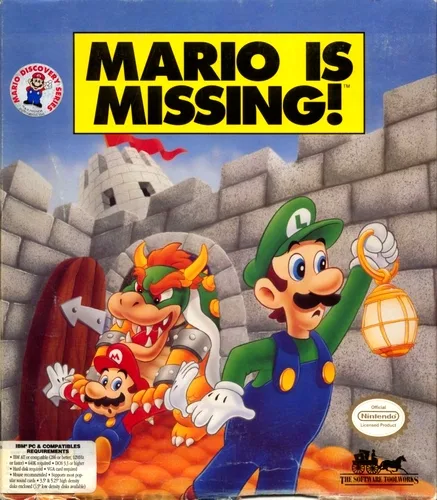
Mario is Missing! cover art
SAVE SLOTS:

๐Ÿ•น๏ธ GAME CONTROLS

Action / ButtonKeyboard Key
D-Pad (Up / Down / Left / Right)Arrow Keys
Button AZ or J
Button BX or K
Button X / Turbo AA or U
Button Y / Turbo BS or I
SelectShift
StartEnter

๐Ÿ’ก Tip: You can also connect any USB / Bluetooth Gamepad controller!

Game Rating & Player Reviews: โญ Not rated yet
โ€“
โ˜†โ˜†โ˜†โ˜†โ˜†
Be the first to rate
Rate this game (Click 1 to 5 stars):
โ˜… โ˜… โ˜… โ˜… โ˜…

✏️ Suggest an edit to Mario is Missing!

๐Ÿšฉ Report Issue with Mario is Missing!:

๐ŸŽฎ VISUAL CONTROLLER MAPPING & GAMEPAD DIAGRAM Auto-Detect: Active
L1 / LB R1 / RB SELECT START Y X A B RETRO ARCADE
Gamepad InputRetro FunctionKeyboard Key
D-Pad / AnalogCharacter Movement / Steeringโ–ฒ โ–ผ โ—„ โ–บ
Button A (East)Primary Action / Attack / FireZ / K
Button B (South)Secondary / Jump / CancelX / J
Button X / YSpecial / Turbo / Extra FireA / S
SelectInsert Coin / Select OptionRight Shift
StartGame Start / Pause GameEnter
Game info: ๐Ÿ‘๏ธ 127 plays
Mario is Missing!
box cover
Game title:Mario is Missing!
Platform:DOS
Author (released): Software Toolworks (1992)
Genre:Platform, Educational
Mode:Single-player
Game size:5169 kB
Emulator Core:DOS
Game Manual: ๐Ÿ“– Official Manual (Built-in)
Share Game:
License:Freeware / Abandonware
Available online emulators for Mario is Missing!:

Different online emulators are available for Mario is Missing!. Select an emulator core below for optimal performance:

Emulator Core EngineTechnologyMultiplayerGamepadTouchAdsAction / Switch
EmulatorJS (Default WebAssembly) WebAssembly / JSYESYES YESNO โ–ถ ACTIVE
MS-DOS (Recommended) WebAssembly / LibretroYESYES YESNO PLAY โšก
JS-DOS v3.0 / DOSBox Engine Emscripten C++YESYES NONO PLAY โšก
Game description:

Developed by Software Toolworks in 1992, Mario is Missing! is a unique educational platformer for DOS that flips the traditional script by putting Luigi in the starring role. Bowser has flooded the real world with Koopas to steal famous landmarks and artifacts, and it’s up to Luigi to travel across real-world cities, return the stolen goods, and rescue his brother.

How to play

Explore various cities, locate Koopas, and jump on them to retrieve stolen artifacts. To return an artifact to its rightful location, you will need to talk to locals, gather clues, and correctly answer trivia questions about the landmark. The game is controlled using standard MS-DOS keyboard inputs, and you can toggle fullscreen by pressing Right Alt + Enter.

Tips

  • Talk to everyone: The locals are essential for figuring out which city you are currently in and which artifact belongs where.
  • Pay attention to the pamphlets: The information you need to answer the trivia questions correctly is usually found in the pamphlets provided at the landmarks.
Screenshots:
Mario is Missing! Screenshot
Player Comments & Discussion: 0 Comments

Leave a Comment / Review:

No comments yet. Be the first gamer to sign the guestbook!