🎮 Play Maou Golvellius (Japan) Online (Sega Master System)

🎲 NEXT RANDOM GAME
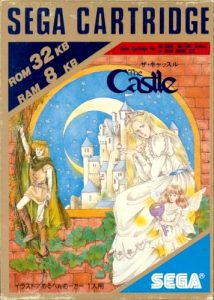
Maou Golvellius (Japan) cover art
SAVE SLOTS:

🕹️ GAME CONTROLS

Action / ButtonKeyboard Key
D-Pad (Up / Down / Left / Right)Arrow Keys
Button AZ or J
Button BX or K
Button X / Turbo AA or U
Button Y / Turbo BS or I
SelectShift
StartEnter

💡 Tip: You can also connect any USB / Bluetooth Gamepad controller!

Game Rating & Player Reviews: ⭐ Not rated yet
☆☆☆☆☆
Be the first to rate
Rate this game (Click 1 to 5 stars):

✏️ Suggest an edit to Maou Golvellius (Japan)

🚩 Report Issue with Maou Golvellius (Japan):

🎮 VISUAL CONTROLLER MAPPING & GAMEPAD DIAGRAM Auto-Detect: Active
L1 / LB R1 / RB SELECT START Y X A B RETRO ARCADE
Gamepad InputRetro FunctionKeyboard Key
D-Pad / AnalogCharacter Movement / Steering
Button A (East)Primary Action / Attack / FireZ / K
Button B (South)Secondary / Jump / CancelX / J
Button X / YSpecial / Turbo / Extra FireA / S
SelectInsert Coin / Select OptionRight Shift
StartGame Start / Pause GameEnter
Game info: 👁️ 110 plays
Maou Golvellius (Japan)
box cover
Game title:Maou Golvellius (Japan)
Platform:Sega Master System
Author (released): Unknown (1988)
Emulator Core:SEGAMS
Game Manual: 📖 Official Manual (Built-in)
Share Game:
License:Freeware / Abandonware
Available online emulators for Maou Golvellius (Japan):

Different online emulators are available for Maou Golvellius (Japan). Select an emulator core below for optimal performance:

Emulator Core EngineTechnologyMultiplayerGamepadTouchAdsAction / Switch
EmulatorJS (Default WebAssembly) WebAssembly / JSYESYES YESNO ▶ ACTIVE
Sega Master System (Recommended) WebAssembly / LibretroYESYES YESNO PLAY ⚡
SMS Plus GX WebAssembly / LibretroYESYES YESNO PLAY ⚡
Game description:

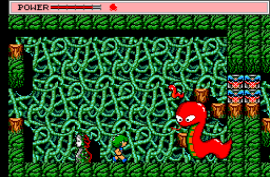
Released in 1988 for the Sega Master System, Maou Golvellius (Japan) (known in the West as Golvellius: Valley of Doom) is an ambitious action RPG developed by Compile. Players control the hero Kelesis on a quest to rescue Princess Rena from the demon king. The adventure is notable for blending different gameplay styles: the overworld is explored from a top-down perspective, while dungeons seamlessly switch into side-scrolling action or vertical-scrolling shooting segments.

How to play

Navigate the Valley of Doom to defeat monsters, collect gold, and conquer boss dungeons to retrieve the magic crystals. Use the Arrow Keys to move Kelesis across the screen. Press Z to attack with your sword, and use X to jump (in side-scrolling areas) or use items. Enter serves as the Start button to pause the action and view your current inventory.

Tips

  • Take time to gather gold from early enemies so you can purchase stronger boots and health potions, as the starting equipment leaves Kelesis very vulnerable.
  • Attack scenery like rocks, trees, and tombstones in the overworld to uncover hidden caves, which often contain shops selling permanent health upgrades and essential items.
  • Your sword attacks in the top-down view can destroy enemy projectiles, which is crucial for surviving crowded areas without taking damage.

Player Comments & Discussion: 0 Comments

Leave a Comment / Review:

No comments yet. Be the first gamer to sign the guestbook!