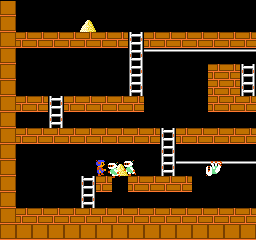
🎮 Play Lode Runner (Japan) Online (NES)

🎲 NEXT RANDOM GAME
Lode Runner (Japan) cover art
SAVE SLOTS:

đŸ•šī¸ GAME CONTROLS

Action / ButtonKeyboard Key
D-Pad (Up / Down / Left / Right)Arrow Keys
Button AZ or J
Button BX or K
Button X / Turbo AA or U
Button Y / Turbo BS or I
SelectShift
StartEnter

💡 Tip: You can also connect any USB / Bluetooth Gamepad controller!

Game Rating & Player Reviews: ⭐ Not rated yet
–
☆☆☆☆☆
Be the first to rate
Rate this game (Click 1 to 5 stars):
★ ★ ★ ★ ★

✏️ Suggest an edit to Lode Runner (Japan)

🚩 Report Issue with Lode Runner (Japan):

🎮 VISUAL CONTROLLER MAPPING & GAMEPAD DIAGRAM Auto-Detect: Active
L1 / LB R1 / RB SELECT START Y X A B RETRO ARCADE
Gamepad InputRetro FunctionKeyboard Key
D-Pad / AnalogCharacter Movement / Steering▲ â–ŧ ◄ â–ē
Button A (East)Primary Action / Attack / FireZ / K
Button B (South)Secondary / Jump / CancelX / J
Button X / YSpecial / Turbo / Extra FireA / S
SelectInsert Coin / Select OptionRight Shift
StartGame Start / Pause GameEnter
Game info: đŸ‘ī¸ 104 plays
Lode Runner (Japan)
box cover
Game title:Lode Runner (Japan)
Platform:NES
Author (released): Unknown (1984)
Emulator Core:NES
Game Manual: 📖 Official Manual (Built-in)
Share Game:
License:Freeware / Abandonware
Available online emulators for Lode Runner (Japan):

Different online emulators are available for Lode Runner (Japan). Select an emulator core below for optimal performance:

Emulator Core EngineTechnologyMultiplayerGamepadTouchAdsAction / Switch
EmulatorJS (Default WebAssembly) WebAssembly / JSYESYES YESNO â–ļ ACTIVE
NES / Famicom (Recommended) WebAssembly / LibretroYESYES YESNO PLAY ⚡
Nestopia UE (Accurate) WebAssembly / LibretroYESYES YESNO PLAY ⚡
Game description:

Lode Runner is a classic 2D puzzle-platformer originally created by Douglas Smith, with this NES version released in 1984. As the Galactic Defender, your goal is to collect all the gold chests scattered across each level while outsmarting the pursuing guards. It remains famous for its challenging logic puzzles, fluid climbing mechanics, and for being one of the first console games to feature a built-in level editor, allowing players to create and play their own custom stages.

How to Play

The objective is to gather every gold chest on the screen to reveal the exit ladder to the next stage. You have no jump button; instead, you rely on climbing ladders, shimmying across hand-over-hand bars, and digging holes. Use the D-pad (mapped to arrow keys) to move and navigate. Press A or B (Z or X on your keyboard) to dig a hole to the left or right of your character. Guards who fall into these holes will be temporarily trapped, allowing you to walk over them safely.

Tips

  • Guards will drop any gold they are carrying when they fall into a hole you've dug.
  • Holes naturally fill back in after a few seconds. If a guard is trapped when the hole fills, they will respawn at the top of the level.
  • You can dig through multiple layers of brick by rapidly digging in a descending staircase pattern, but be careful not to trap yourself.

Player Comments & Discussion: 0 Comments

Leave a Comment / Review:

No comments yet. Be the first gamer to sign the guestbook!


