🎮 Play Gegege no Kitarou – Youkai Dai Makyou (Japan) Online (NES)

🎲 NEXT RANDOM GAME
Gegege no Kitarou – Youkai Dai Makyou (Japan) cover art
SAVE SLOTS:

đŸ•šī¸ GAME CONTROLS

Action / ButtonKeyboard Key
D-Pad (Up / Down / Left / Right)Arrow Keys
Button AZ or J
Button BX or K
Button X / Turbo AA or U
Button Y / Turbo BS or I
SelectShift
StartEnter

💡 Tip: You can also connect any USB / Bluetooth Gamepad controller!

Game Rating & Player Reviews: ⭐ Not rated yet
–
☆☆☆☆☆
Be the first to rate
Rate this game (Click 1 to 5 stars):
★ ★ ★ ★ ★

✏️ Suggest an edit to Gegege no Kitarou – Youkai Dai Makyou (Japan)

🚩 Report Issue with Gegege no Kitarou – Youkai Dai Makyou (Japan):

🎮 VISUAL CONTROLLER MAPPING & GAMEPAD DIAGRAM Auto-Detect: Active
L1 / LB R1 / RB SELECT START Y X A B RETRO ARCADE
Gamepad InputRetro FunctionKeyboard Key
D-Pad / AnalogCharacter Movement / Steering▲ â–ŧ ◄ â–ē
Button A (East)Primary Action / Attack / FireZ / K
Button B (South)Secondary / Jump / CancelX / J
Button X / YSpecial / Turbo / Extra FireA / S
SelectInsert Coin / Select OptionRight Shift
StartGame Start / Pause GameEnter
Game info: đŸ‘ī¸ 90 plays
Gegege no Kitarou – Youkai Dai Makyou (Japan)
box cover
Game title:Gegege no Kitarou – Youkai Dai Makyou (Japan)
Platform:NES
Emulator Core:NES
Game Manual: 📖 Official Manual (Built-in)
Share Game:
License:Freeware / Abandonware
Available online emulators for Gegege no Kitarou – Youkai Dai Makyou (Japan):

Different online emulators are available for Gegege no Kitarou – Youkai Dai Makyou (Japan). Select an emulator core below for optimal performance:

Emulator Core EngineTechnologyMultiplayerGamepadTouchAdsAction / Switch
EmulatorJS (Default WebAssembly) WebAssembly / JSYESYES YESNO PLAY ⚡
NES / Famicom (Recommended) WebAssembly / LibretroYESYES YESNO PLAY ⚡
Nestopia UE (Accurate) WebAssembly / LibretroYESYES YESNO â–ļ ACTIVE
Game description:

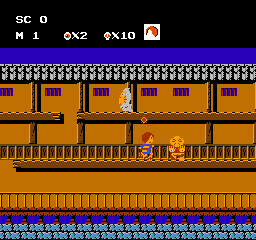
Gegege no Kitarou – Youkai Dai Makyou is an action platformer developed by Bandai and released for the Famicom (NES) in 1986. Based on the classic manga, you control Kitarou as he travels across an overhead map to enter challenging side-scrolling stages. Defeating enemies and navigating these areas allows you to collect essential items and face off against formidable yokai bosses. For its North American release, this game was heavily altered and rebranded as Ninja Kid.

How to Play

Your goal on each map is to conquer the side-scrolling action stages, defeat mini-bosses in the towers, and bring the required scrolls to the center hut to fight the main boss. In the browser, the standard NES controls apply:

  • Arrow Keys (D-pad): Move Kitarou on the map and in stages.
  • Z Key (A button): Jump.
  • X Key (B button): Fire Kitarou’s hair needles.
  • Enter (Start): Pause the game.

Tips

  • Sub-weapons: Kitarou can acquire powerful secondary weapons like his remote-controlled geta (sandal) or his chanchanko (spirit vest). Keep an eye out for them, but use them wisely as ammo is limited.
  • Boss Summons: If you collect whistles during the side-scrolling stages, you can use them in boss fights. Crouch in the far-left corner of the screen during a boss battle to summon an allied yokai familiar to help you fight.

Player Comments & Discussion: 0 Comments

Leave a Comment / Review:

No comments yet. Be the first gamer to sign the guestbook!


