🎮 Play Dragon Buster (Japan) Online (NES)

🎲 NEXT RANDOM GAME
Dragon Buster (Japan) cover art
SAVE SLOTS:

đŸ•šī¸ GAME CONTROLS

Action / ButtonKeyboard Key
D-Pad (Up / Down / Left / Right)Arrow Keys
Button AZ or J
Button BX or K
Button X / Turbo AA or U
Button Y / Turbo BS or I
SelectShift
StartEnter

💡 Tip: You can also connect any USB / Bluetooth Gamepad controller!

Game Rating & Player Reviews: ⭐ Not rated yet
–
☆☆☆☆☆
Be the first to rate
Rate this game (Click 1 to 5 stars):
★ ★ ★ ★ ★

✏️ Suggest an edit to Dragon Buster (Japan)

🚩 Report Issue with Dragon Buster (Japan):

🎮 VISUAL CONTROLLER MAPPING & GAMEPAD DIAGRAM Auto-Detect: Active
L1 / LB R1 / RB SELECT START Y X A B RETRO ARCADE
Gamepad InputRetro FunctionKeyboard Key
D-Pad / AnalogCharacter Movement / Steering▲ â–ŧ ◄ â–ē
Button A (East)Primary Action / Attack / FireZ / K
Button B (South)Secondary / Jump / CancelX / J
Button X / YSpecial / Turbo / Extra FireA / S
SelectInsert Coin / Select OptionRight Shift
StartGame Start / Pause GameEnter
Game info: đŸ‘ī¸ 109 plays
Dragon Buster (Japan)
box cover
Game title:Dragon Buster (Japan)
Platform:NES
Author (released): Unknown (1987)
Emulator Core:NES
Game Manual: 📖 Official Manual (Built-in)
Share Game:
License:Freeware / Abandonware
Available online emulators for Dragon Buster (Japan):

Different online emulators are available for Dragon Buster (Japan). Select an emulator core below for optimal performance:

Emulator Core EngineTechnologyMultiplayerGamepadTouchAdsAction / Switch
EmulatorJS (Default WebAssembly) WebAssembly / JSYESYES YESNO â–ļ ACTIVE
NES / Famicom (Recommended) WebAssembly / LibretroYESYES YESNO PLAY ⚡
Nestopia UE (Accurate) WebAssembly / LibretroYESYES YESNO PLAY ⚡
Game description:

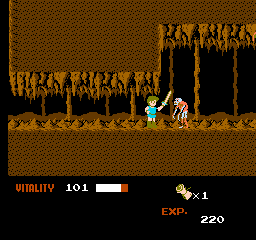
Dragon Buster is a classic side-scrolling action RPG released by Namco for the Famicom in Japan in 1987, based on their groundbreaking 1984 arcade hit. Controlling the knight Clovis, players navigate branching dungeon maps to defeat monsters and rescue Princess Celia from dragon-infested keeps.

How to Play

Explore dungeon stages, defeat enemies, and locate the boss room in each castle to advance across the map. Clovis features a Vitality gauge; taking damage reduces health, while items like potions and shields found throughout dungeons restore HP and boost defense.

Browser Controls

  • D-Pad (Arrow Keys): Move Clovis, duck, or select dungeon paths on the map.
  • A Button (X Key): Jump. Press A again in mid-air to execute a double jump.
  • B Button (Z Key): Attack with sword. Hold Down + B in mid-air for a downward thrust.
  • Start (Enter): Start game or pause action.
  • Select (Shift): Move cursor on map and menu screens.

Tips & Strategies

  • Master the Double Jump: Press A a second time at the peak of your leap to reach elevated platforms and dodge airborne enemies.
  • Use Downward Thrust: Jump above tough enemies and hold Down + B to deliver high-damage downward sword strikes.
  • Collect Magic Spells: Pick up items like Fireballs for ranged attacks and Shields to reduce incoming damage.

Player Comments & Discussion: 0 Comments

Leave a Comment / Review:

No comments yet. Be the first gamer to sign the guestbook!


