๐ŸŽฎ Play Defender Online (DOS)

๐ŸŽฒ NEXT RANDOM GAME
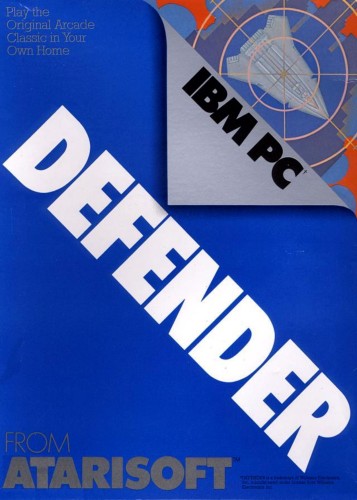
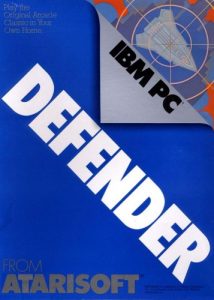
Defender cover art
SAVE SLOTS:

๐Ÿ•น๏ธ GAME CONTROLS

Action / ButtonKeyboard Key
D-Pad (Up / Down / Left / Right)Arrow Keys
Button AZ or J
Button BX or K
Button X / Turbo AA or U
Button Y / Turbo BS or I
SelectShift
StartEnter

๐Ÿ’ก Tip: You can also connect any USB / Bluetooth Gamepad controller!

Game Rating & Player Reviews: โญ Not rated yet
โ€“
โ˜†โ˜†โ˜†โ˜†โ˜†
Be the first to rate
Rate this game (Click 1 to 5 stars):
โ˜… โ˜… โ˜… โ˜… โ˜…

✏️ Suggest an edit to Defender

๐Ÿšฉ Report Issue with Defender:

๐ŸŽฎ VISUAL CONTROLLER MAPPING & GAMEPAD DIAGRAM Auto-Detect: Active
L1 / LB R1 / RB SELECT START Y X A B RETRO ARCADE
Gamepad InputRetro FunctionKeyboard Key
D-Pad / AnalogCharacter Movement / Steeringโ–ฒ โ–ผ โ—„ โ–บ
Button A (East)Primary Action / Attack / FireZ / K
Button B (South)Secondary / Jump / CancelX / J
Button X / YSpecial / Turbo / Extra FireA / S
SelectInsert Coin / Select OptionRight Shift
StartGame Start / Pause GameEnter
Game info: ๐Ÿ‘๏ธ 125 plays
Defender
box cover
Game title:Defender
Platform:DOS
Author (released): Williams Electronics (1980)
Genre:Action, Shooter
Mode:Multiplayer
Game size:21 kB
Emulator Core:DOS
Game Manual: ๐Ÿ“– Official Manual (Built-in)
Share Game:
License:Freeware / Abandonware
Available online emulators for Defender:

Different online emulators are available for Defender. Select an emulator core below for optimal performance:

Emulator Core EngineTechnologyMultiplayerGamepadTouchAdsAction / Switch
EmulatorJS (Default WebAssembly) WebAssembly / JSYESYES YESNO โ–ถ ACTIVE
MS-DOS (Recommended) WebAssembly / LibretroYESYES YESNO PLAY โšก
JS-DOS v3.0 / DOSBox Engine Emscripten C++YESYES NONO PLAY โšก
Game description:

Developed by Williams Electronics in 1980, Defender is a legendary action-shooter ported to DOS. You pilot a spaceship across a side-scrolling, wrap-around landscape, tasked with destroying waves of hostile aliens while protecting vulnerable astronauts on the planet’s surface.

How to play

Clear the screen of alien invaders while preventing Landers from abducting the humanoids below. For this DOS release, maneuver your ship using the arrow keys, and use your action keys (typically Spacebar, Ctrl, or Alt) to fire lasers, apply thrust, reverse direction, and trigger smart bombs.

Tips

  • Target Landers early: Prioritize destroying Landers before they reach the ground. If they successfully abduct an astronaut and reach the top of the screen, they transform into aggressive, fast-moving Mutants.
  • Catch falling astronauts: If you shoot a Lander that is carrying a captive, the astronaut will fall. Catch them mid-air before they hit the ground for a significant point bonus.
  • Conserve smart bombs: Smart bombs clear every enemy on the screen instantly, but you start with a limited supply. Save them for overwhelming situations.
Screenshots:
Defender Screenshot
Player Comments & Discussion: 0 Comments

Leave a Comment / Review:

No comments yet. Be the first gamer to sign the guestbook!