🎮 Play Dai Meiro – Meikyuu no Tatsujin (Japan) Online (NES)

🎲 NEXT RANDOM GAME
Dai Meiro – Meikyuu no Tatsujin (Japan) cover art
SAVE SLOTS:

đŸ•šī¸ GAME CONTROLS

Action / ButtonKeyboard Key
D-Pad (Up / Down / Left / Right)Arrow Keys
Button AZ or J
Button BX or K
Button X / Turbo AA or U
Button Y / Turbo BS or I
SelectShift
StartEnter

💡 Tip: You can also connect any USB / Bluetooth Gamepad controller!

Game Rating & Player Reviews: ⭐ Not rated yet
–
☆☆☆☆☆
Be the first to rate
Rate this game (Click 1 to 5 stars):
★ ★ ★ ★ ★

✏️ Suggest an edit to Dai Meiro – Meikyuu no Tatsujin (Japan)

🚩 Report Issue with Dai Meiro – Meikyuu no Tatsujin (Japan):

🎮 VISUAL CONTROLLER MAPPING & GAMEPAD DIAGRAM Auto-Detect: Active
L1 / LB R1 / RB SELECT START Y X A B RETRO ARCADE
Gamepad InputRetro FunctionKeyboard Key
D-Pad / AnalogCharacter Movement / Steering▲ â–ŧ ◄ â–ē
Button A (East)Primary Action / Attack / FireZ / K
Button B (South)Secondary / Jump / CancelX / J
Button X / YSpecial / Turbo / Extra FireA / S
SelectInsert Coin / Select OptionRight Shift
StartGame Start / Pause GameEnter
Game info: đŸ‘ī¸ 86 plays
Dai Meiro – Meikyuu no Tatsujin (Japan)
box cover
Game title:Dai Meiro – Meikyuu no Tatsujin (Japan)
Platform:NES
Emulator Core:NES
Game Manual: 📖 Official Manual (Built-in)
Share Game:
License:Freeware / Abandonware
Available online emulators for Dai Meiro – Meikyuu no Tatsujin (Japan):

Different online emulators are available for Dai Meiro – Meikyuu no Tatsujin (Japan). Select an emulator core below for optimal performance:

Emulator Core EngineTechnologyMultiplayerGamepadTouchAdsAction / Switch
EmulatorJS (Default WebAssembly) WebAssembly / JSYESYES YESNO â–ļ ACTIVE
NES / Famicom (Recommended) WebAssembly / LibretroYESYES YESNO PLAY ⚡
Nestopia UE (Accurate) WebAssembly / LibretroYESYES YESNO PLAY ⚡
Game description:

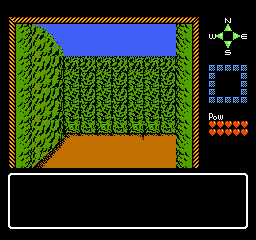
Navigate complex first-person dungeons before your power runs out in Dai Meiro – Meikyuu no Tatsujin (Japan), a classic maze exploration game developed by Epoch for the NES. Originally released exclusively for the Famicom, it challenges players to master its labyrinthine corridors by carefully managing resources while searching for the exit.

How to Play

Your objective is to find your way out of each sprawling 3D maze before your limited battery power depletes. Move through the corridors using the D-pad (mapped to your arrow keys) to step forward, backward, or turn. The A and B buttons (Z and X keys) allow you to interact with the environment, while Start (Enter) pauses the game.

Tips

Mapping your route on paper is highly recommended, as the similar wall textures in the first-person perspective can easily disorient you. Keep a close eye on your power meter and prioritize picking up battery refills over exploring dead ends when running low.


Player Comments & Discussion: 0 Comments

Leave a Comment / Review:

No comments yet. Be the first gamer to sign the guestbook!

