🎮 Play Chessmaster Online (NES)

🎲 NEXT RANDOM GAME
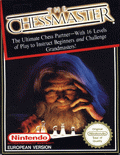
Chessmaster cover art
SAVE SLOTS:

🕹️ GAME CONTROLS

Action / ButtonKeyboard Key
D-Pad (Up / Down / Left / Right)Arrow Keys
Button AZ or J
Button BX or K
Button X / Turbo AA or U
Button Y / Turbo BS or I
SelectShift
StartEnter

💡 Tip: You can also connect any USB / Bluetooth Gamepad controller!

Game Rating & Player Reviews: ⭐ Not rated yet
☆☆☆☆☆
Be the first to rate
Rate this game (Click 1 to 5 stars):

✏️ Suggest an edit to Chessmaster

🚩 Report Issue with Chessmaster:

🎮 VISUAL CONTROLLER MAPPING & GAMEPAD DIAGRAM Auto-Detect: Active
L1 / LB R1 / RB SELECT START Y X A B RETRO ARCADE
Gamepad InputRetro FunctionKeyboard Key
D-Pad / AnalogCharacter Movement / Steering
Button A (East)Primary Action / Attack / FireZ / K
Button B (South)Secondary / Jump / CancelX / J
Button X / YSpecial / Turbo / Extra FireA / S
SelectInsert Coin / Select OptionRight Shift
StartGame Start / Pause GameEnter
Game info: 👁️ 153 plays
Chessmaster
box cover
Game title:Chessmaster
Platform:NES
Author (released): Software Toolworks (1989)
Genre:Puzzle
Mode:Single-player
Game size:160 kB
Emulator Core:NES
Game Manual: 📖 Official Manual (Built-in)
Share Game:
License:Freeware / Abandonware
Available online emulators for Chessmaster:

Different online emulators are available for Chessmaster. Select an emulator core below for optimal performance:

Emulator Core EngineTechnologyMultiplayerGamepadTouchAdsAction / Switch
EmulatorJS (Default WebAssembly) WebAssembly / JSYESYES YESNO ▶ ACTIVE
NES / Famicom (Recommended) WebAssembly / LibretroYESYES YESNO PLAY ⚡
Nestopia UE (Accurate) WebAssembly / LibretroYESYES YESNO PLAY ⚡
Game description:

Chessmaster is a chess game for the NES, published by Software Toolworks in 1989. One of the strongest chess programs available on 8-bit consoles, it brings a capable AI engine and adjustable difficulty settings to the Nintendo living room — accessible to players still learning the rules and competitive for experienced opponents looking for a real game.

How to Play

Move the cursor across the board with the arrow keys. Press X to select a piece; legal destination squares become available. Navigate to your chosen square and press X again to complete the move. Press Z to deselect without moving. Enter opens the menu where you can adjust the AI difficulty, swap sides, or take back a move.

The objective is checkmate — leave the opponent’s king with no safe square to move to. Open with pawns to control the centre, develop your knights and bishops before your heavy pieces, and castle to get your king behind a row of pawns before launching an attack.

Tips

  • Start on the lowest difficulty to get comfortable with the cursor and the AI’s pace — the gap between difficulty tiers is real, so work up gradually.
  • Castle early. Chessmaster’s engine reliably punishes an exposed king, and kingside castling is the quickest shelter available.
  • Use the take-back option in the menu after a losing move. Seeing exactly how the AI responded to your mistake is faster and more instructive than restarting the whole game.
Screenshots:
Chessmaster Screenshot
Player Comments & Discussion: 0 Comments

Leave a Comment / Review:

No comments yet. Be the first gamer to sign the guestbook!



